Desk Setup & Accessories
Best Stream Deck Alternatives for Productivity in 2026
4 picks compared
8 min read
Unbiased Advice & Insights is reader-supported. As an Amazon Associate we earn from qualifying purchases, at no extra cost to you. It never changes our picks.
?How we pickedWe compare published specifications, safety certifications and thousands of verified owner reviews, and we do not physically test every unit. Read the full process in our review methodology.
Loupedeck Live S
★★★★★ 4.4 / 5 Best overall
The Loupedeck Live S pairs a grid of customizable touchscreen keys with two rotary dials, which makes it stronger than a plain key pad for productivity work like scrubbing timelines, nudging volume, or scrolling documents. Its software supports profiles that switch automatically per app, so the same buttons do different jobs in your browser and your editor.
Inputs Touch LCD keys plus 2 dialsProfiles Auto app switchingConnection USB-C
- Rotary dials add analog control a key pad lacks
- Per app profiles reduce how much you memorize
- Mature software with deep macro and plugin support
- Software has a real learning curve at first
- Fewer dials than the larger Loupedeck models
Mountain DisplayPad
★★★★★ 4.1 / 5 Modular pick
The Mountain DisplayPad is a grid of small LCD keys that can attach magnetically to Mountain keyboards or sit on its own. Each key shows a custom icon and can fire macros, launch apps, or paste text. It is a clean, tactile alternative if you like the idea of a modular desk that grows with your workflow.
Inputs LCD keys, modular tilesMounting Standalone or magneticConnection USB-C
- Bright per key LCD icons
- Modular design attaches to Mountain gear
- Solid key feel for a screen pad
- Software is less mature than Loupedeck or Elgato
- Smaller community means fewer ready-made icon packs
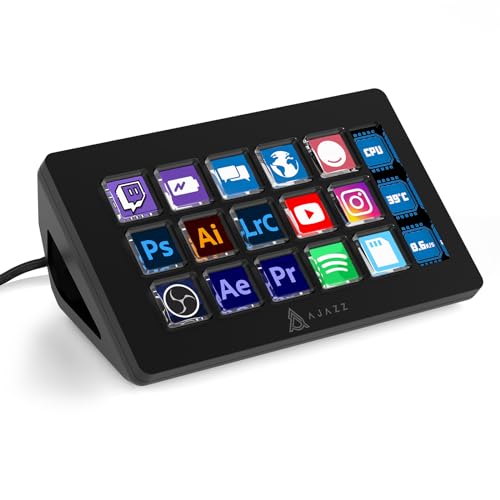
Ajazz AKP153
★★★★★ 4 / 5 Best value
The Ajazz AKP153 is a 15 key LCD controller that mirrors the classic Stream Deck layout at a much lower price. It ships with its own software for icons, macros, and folders, and the community has built extra tooling around it. For simple app launching and hotkey firing on a budget, it covers the basics well.
Keys 15 LCD keysSoftware Vendor app plus community toolsConnection USB-C
- Low cost entry into LCD key control
- Familiar 15 key grid layout
- Growing community support and plugins
- Bundled software can feel rough and awkwardly translated
- Less polished and reliable than premium options
TourBox Elite
★★★★★ 4.3 / 5 For editors
The TourBox Elite skips LCD screens in favor of dials, knobs, and shaped buttons you learn by feel, which suits photo and video editors who want to keep their eyes on the screen. It connects over Bluetooth or USB and maps controls per app, so a knob can brush size in one program and a timeline scrubber in another.
Inputs Dial, knob, scroll, buttonsConnection Bluetooth or USBProfiles Per app mapping
- Tactile controls you operate without looking
- Excellent for creative editing workflows
- Wireless option keeps the desk clean
- No screen labels, so you must memorize mappings
- Setup takes time to feel natural
Published July 19, 2026 · Availability last checked July 2026 · Reviewed by the UAI editorial team · How we research and score
Decide between screen keys and tactile dials
The core split among alternatives is labeled LCD keys versus tactile dials and buttons you learn by touch. Screen keys like those on the Loupedeck and Ajazz show what each button does, which is great when you have dozens of actions to remember. Dial-first devices like the TourBox let you keep your eyes on your work and adjust values smoothly, which suits editing more than app launching.
Software is the real product
The hardware is only as useful as the app that drives it, so weigh software before you fall for a button count. Look for automatic profile switching so the same keys change function per app, a library of ready-made actions, and plugins for the tools you actually use. Budget controllers often undercut on price but ship rougher software, which you pay for in setup time.
Map actions to how you actually work
Start by listing the ten actions you repeat most, such as switching audio devices, inserting canned replies, toggling a mute, or opening a project. Assign those first and add folders for the rest. A common mistake is filling every key on day one, which makes the device harder to remember than useful.
Connectivity and desk space
Most alternatives use USB-C, but a few offer Bluetooth for a cleaner desk or laptop use on the go. Wireless is convenient but adds battery management and occasional pairing hiccups. Also check the footprint, since a large panel plus dials can crowd a small desk more than a compact key pad.
Consider the ecosystem and longevity
A larger community means more shared icon packs, profiles, and troubleshooting help, which extends the life of your device. Established makers like Loupedeck and TourBox tend to keep updating their software, while lesser known brands can go quiet. Factor in whether the maker is likely to support your operating system a few years from now.
More guides
See our full guides hub and our research and scoring methodology. Every pick is judged on the same weighted criteria: real-world performance, reliability, ease of use, owner satisfaction and value.
Questions people ask
Do Stream Deck alternatives work for non-streaming productivity?
Yes. Most of these can launch apps, paste text snippets, fire keyboard shortcuts, open folders, and run multi-step macros. Productivity is arguably their strongest use, since you spend all day in the same apps and benefit from one-touch actions.
Why pick a device with dials instead of only buttons?
Dials give you smooth analog control for things a button cannot do well, such as adjusting volume, scrubbing a video timeline, or zooming. If your work involves fine adjustment rather than only on and off actions, a device like the Loupedeck Live S or TourBox Elite pays off.
Is the bundled software as good as the Elgato app?
It varies. Loupedeck and TourBox software is mature and well supported, while budget controllers often ship rougher apps. Check that your key apps have profiles or plugins before you buy, since software quality matters more than the hardware for daily use.
Can I use one across Windows and Mac?
Most of these support both Windows and macOS, but feature parity is not guaranteed. If you switch between platforms, confirm the software runs on both and that profiles carry over, since some plugins are platform specific.
The bottom lineSo which one?
The Loupedeck Live S is the most flexible Stream Deck alternative for productivity because it combines labeled touch keys with rotary dials and strong per app profiles. Editors who prefer feel over screens should look at the TourBox Elite, while the Ajazz AKP153 covers basic hotkey needs cheaply.