Best Laptops for Students
Best Laptops for Students in 2026: Our Top 4 Picks
4 picks compared
8 min read
Unbiased Advice & Insights is reader-supported. As an Amazon Associate we earn from qualifying purchases, at no extra cost to you. It never changes our picks.
?How we pickedWe compare published specifications, safety certifications and thousands of verified owner reviews, and we do not physically test every unit. Read the full process in our review methodology.
Apple MacBook Air 13-inch (M3)
★★★★★ 4.8 / 5 Best overall
The M3 MacBook Air is the laptop we would point most students toward, because it pairs long battery life with a fanless, silent design that stays cool during long study sessions. It handles browsers full of tabs, note apps, and light photo or video work without slowing down.
Chip Apple M3, 8-core CPUBattery Up to about 18 hoursWeight Roughly 2.7 lb
- All-day battery that easily covers a full day of classes
- Silent, fanless design stays cool under load
- Bright, sharp Liquid Retina display
- Base model ships with 8GB of memory
- Only two Thunderbolt ports plus a headphone jack
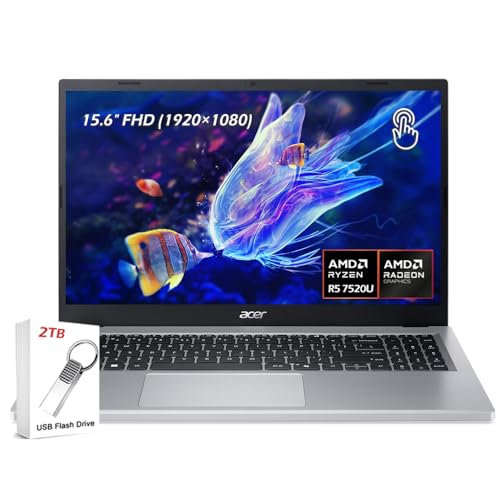
Acer Aspire 5
★★★★★ 4.4 / 5 Best budget
The Aspire 5 is a dependable pick for students who want a full-size Windows laptop without spending much. It covers the essentials, a roomy 15.6-inch screen, a real keyboard with a number pad, and enough ports to skip the dongle life.
Display 15.6-inch full HDPorts USB-C, USB-A, HDMIOS Windows 11
- Strong value for everyday schoolwork
- Wide port selection including HDMI
- Comfortable full-size keyboard
- Plastic build feels less premium
- Battery life trails the MacBook Air
ASUS Zenbook 14 OLED
★★★★★ 4.6 / 5 Best display
If a gorgeous screen matters for design classes or long reading, the Zenbook 14 OLED stands out. Its OLED panel delivers deep contrast and punchy color in a thin, light chassis that slides easily into a backpack.
Display 14-inch OLEDWeight Around 2.8 lbPorts Thunderbolt, USB-A, HDMI
- Vivid OLED screen with excellent contrast
- Slim and genuinely portable
- Good port variety for a thin laptop
- OLED can draw more battery at high brightness
- Glossy screen shows glare in bright rooms
Lenovo IdeaPad Slim 5
★★★★★ 4.5 / 5 Best value Windows
The IdeaPad Slim 5 lands in a sweet spot between price and polish. You get a comfortable keyboard, solid everyday performance, and a build that feels a step above entry-level machines, which makes it a smart all-rounder for most majors.
Display 14 or 16-inch optionsOS Windows 11Ports USB-C, USB-A, HDMI
- Comfortable, accurate keyboard
- Balanced performance for the money
- Feels sturdier than budget rivals
- Speakers are only average
- Configurations vary widely by retailer
Published July 16, 2026 · Availability last checked July 2026 · Reviewed by the UAI editorial team · How we research and score
Battery life comes first
The single most useful trait in a student laptop is a battery that survives a full day of classes without a charger. Aim for a machine rated around 12 hours or more, since real-world use with bright screens and many tabs always falls short of the official number.
Weight and size
You will carry this everywhere, so a 13 or 14-inch model in the 2.5 to 3 pound range is the sweet spot. A 15 or 16-inch screen is nicer for spreadsheets and design work, but it adds bulk to your bag.
Do not skimp on memory
Storage is easy to supplement with the cloud, but memory is not upgradable on most modern laptops. If you can stretch to 16GB of RAM, do it, because it keeps the laptop responsive for years as software gets heavier.
Model numbers and safety
Each pick lists its model above. Product availability and recalls change, so confirm the exact model and its current recall status on cpsc.gov before buying.
More guides
See our full buying guides hub and our research and scoring methodology. Every pick is judged on the same weighted criteria: owner satisfaction, performance, ease of use, reliability and value.
Questions people ask
How much RAM does a student laptop need?
For browsing, notes, and streaming, 8GB works, but 16GB gives more breathing room for heavy multitasking and keeps a laptop usable longer, so choose 16GB if the budget allows.
Is a MacBook or a Windows laptop better for school?
Both are fine. Pick macOS for battery life and simplicity, and Windows for lower prices, wider software support, and easier compatibility with certain campus tools.
How much storage should I get?
256GB is a reasonable starting point if you use cloud storage, but 512GB is safer if you keep photos, projects, or games on the device itself.
The bottom lineSo which one?
The MacBook Air 13-inch (M3) is our overall winner for its battery and quiet design, the Acer Aspire 5 is the budget champion, the Zenbook 14 OLED suits screen-focused work, and the IdeaPad Slim 5 is the best-value Windows all-rounder.