E-Ink Tablets
Best E Ink Tablet for Reading PDFs and Note Taking
4 picks compared
8 min read
Unbiased Advice & Insights is reader-supported. As an Amazon Associate we earn from qualifying purchases, at no extra cost to you. It never changes our picks.
?How we pickedWe compare published specifications, safety certifications and thousands of verified owner reviews, and we do not physically test every unit. Read the full process in our review methodology.
Onyx Boox Tab Ultra C
★★★★★ 4.5 / 5 Best overall
The Tab Ultra C combines a color Kaleido screen with full Android, which makes it one of the most capable slates for dense, complex PDFs. You can pan, zoom, reflow, and annotate technical documents, then sync through any cloud app you prefer, all on a 10.3 inch panel.
Display 10.3 inch color Kaleido 3 e-inkOS Android with full app supportUse PDF markup, split screen, handwriting
- Handles heavy, image rich PDFs better than most
- Color helps with charts and highlighted text
- Android apps for reading, notes, and cloud sync
- Color e-ink is dimmer and lower resolution than grayscale
- The feature rich interface has a learning curve
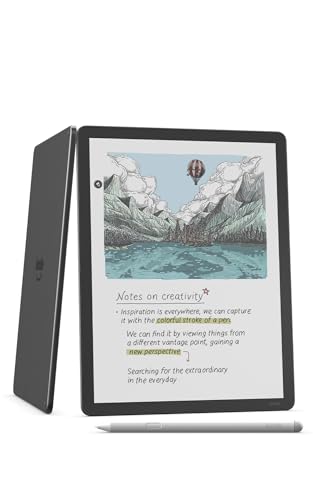
Amazon Kindle Scribe
★★★★★ 4.4 / 5 Best for text reading
The Kindle Scribe's 300 ppi display is the crispest in this group for long form text, and note taking is smooth and lag free. It is the easiest pick if most of your PDFs are book style documents and your library already lives in the Kindle world.
Display 10.2 inch grayscale, 300 ppiNotes Handwriting notebooks built inEcosystem Kindle store and Send to Kindle
- Sharpest text of the group at 300 ppi
- Fluid, low latency handwriting
- Simple, polished reading experience
- PDF annotation tools are more limited than Boox
- Awkward with non Amazon file formats
reMarkable 2
★★★★★ 4.3 / 5 Best writing feel
For anyone who writes more than they read, the reMarkable 2 offers the closest thing to paper, with a textured surface and very low latency. It handles PDF markup cleanly in a focused interface, though large or complex documents can render more slowly than on faster hardware.
Display 10.3 inch grayscale e-inkFeel Paper like textured writing surfaceInterface Minimal, distraction free
- Excellent handwriting texture and responsiveness
- Clean PDF markup with no clutter
- Great for pure focus and note heavy work
- Grayscale only and no app ecosystem
- Big or graphic heavy PDFs can feel sluggish
Onyx Boox Tab X
★★★★★ 4.4 / 5 Best large screen
The 13.3 inch Boox Tab X is built for people whose PDFs are engineering drawings, sheet music, or full page documents that shrink uncomfortably on a 10 inch slate. The extra area lets you view a page at close to true size while still handwriting notes in the margins.
Display 13.3 inch grayscale e-inkOS Android with full app supportUse Full page PDFs, sheet music, drawings
- Large panel shows dense PDFs near full size
- Open Android for any reader or note app
- Great for technical and academic documents
- Big and heavier, less pocketable for casual reading
- Larger e-ink panels command a higher price
Published July 19, 2026 · Availability last checked July 2026 · Reviewed by the UAI editorial team · How we research and score
Match the screen to your documents
The single biggest factor for PDF work is screen size. Novels and simple documents are fine on a 10 inch slate, but dense two column papers, sheet music, and CAD drawings really want a 13.3 inch panel so you are not constantly zooming. Decide what your typical document looks like before you pick a size.
Annotation tools and file freedom
Boox tablets run full Android, so you can install your preferred PDF reader, use layers and shapes, and sync to any cloud, which is ideal for heavy markup. Kindle and reMarkable are more locked down and focused, offering cleaner interfaces but fewer options for moving files and organizing large libraries.
Writing feel versus reading sharpness
There is a mild trade off between the best handwriting texture and the sharpest text. The reMarkable 2 leads on paper like feel, the Kindle Scribe leads on crisp 300 ppi text, and Boox sits in the middle while adding color and app flexibility. Rank those three qualities by what you will do most.
More guides
See our full guides hub and our research and scoring methodology. Every pick is judged on the same weighted criteria: real-world performance, reliability, ease of use, owner satisfaction and value.
Questions people ask
What screen size is best for PDFs?
A 10.3 inch panel is a good all round size, but if your PDFs are full page technical drawings, sheet music, or two column academic papers, a 13.3 inch tablet like the Boox Tab X shows them much closer to true size with less zooming and panning.
Is color e-ink worth it for annotations?
Color can help with highlighted text, charts, and diagrams, but current color e-ink is dimmer and lower resolution than grayscale. If your PDFs are mostly text and you want the sharpest, brightest page, a grayscale device is often the better reading experience.
Which tablet is best for both reading and heavy note taking?
For flexibility the Boox Tab Ultra C wins because Android lets you run any reader and note app and sync anywhere. If writing feel matters most, the reMarkable 2 is hard to beat, and Kindle owners get the smoothest text on the Scribe.
The bottom lineSo which one?
The Boox Tab Ultra C is the most versatile pick for mixing PDF markup with handwriting thanks to color and open Android. Choose the 13.3 inch Boox Tab X if your documents are large or technical, and the reMarkable 2 if writing feel is your top priority.